
Tag: PLM
-
Webinar 8
Webinar 8 Please see the link below to the 8th PLM Webinar: Release 6, Public Links, Access Rights Delegation EDMS: 3469138
-
How to get the access rights in the Design Code?
How to get the access rights in the Design Code? PLM users can directly request Design Code access from the PLM platform through a dedicated access request interface. The administrators of the group will be responsible for handling your request and you'll get notified by email as soon as a decision is taken.
-
What tools are available in the PDM Workbenches (PWB)
What tools are available in the PDM Workbenches (PWB) The PLM and CATIA are connected through the connector, PDM Workbench (PWB). There is a toolbar and different workbenches for the various CATIA workbenches (Part Design, Assembly design, drafting). The PDM workbenches do not contain any modelling tools, but have tools to manage the documents such
-
Release notes 5.7
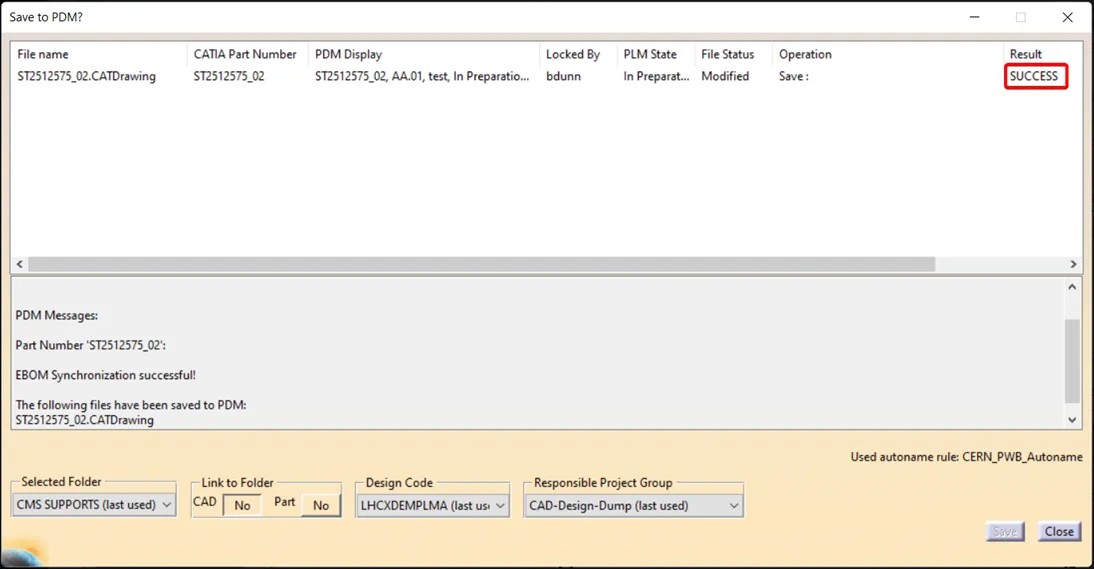
Release notes 5.7 The full release notes are available here. IMPORTANT Please be aware that after saving a drawing, there is currently no confirmation response or save icon displayed in the PDM window. This is a known issue and we are actively waiting for a fix to be implemented. In the meantime, we kindly ask
-
Release Notes 5.6
Release Notes 5.6 The full release notes are available here. The main new features of this release are: CATIA Connector version 17.1.18 Bug Fix – In some isolated cases, file name of CAD Documents can change across version. In this case, the following messages will appear when saving: Saving is still possible, but users must
-
How to change a Design Code?
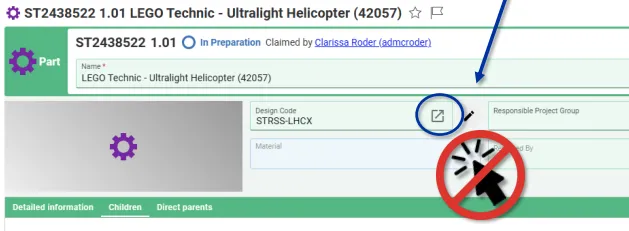
How to change a Design Code? To change the Design Code assigned to a Part follow the steps below: Note, in Edit mode, the icon next to the Design Code field opens the current Design Codes profile card. It cannot be used to search and select a new code. Note: If you would like to
-
How to add and/or propagate a Design Code?
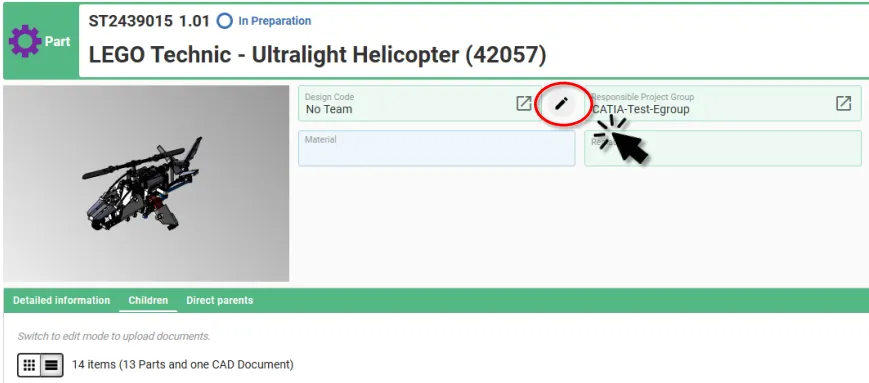
How to add and/or propagate a Design Code? In the PLM Platform there are two ways to add a Design Code to a Part, and one method to add and propagate it down to the child Parts: Adding and propagating Design Codes using the Pen Tool Selecting the small pen icon will display a new
-
What are the meanings of the drawing labels?
What are the meanings of the drawing labels? Below are the different drawing labels that can be assigned to a drawing via the 'Assign drawing label' workflow. Complete documentation: Assign Drawing(s) Label Workflow FAQ
-
Upcoming CAD Forum
Upcoming CAD Forum The next CAD Forum is on Thursday 11 December 2025. The Forum will be held in the Kjell Johnsen auditorium (30-7-018) from 9:00 to 12:00 and will be in-person only. This 3rd session will be mainly focused on the new PLM migration and the related workflows. The agenda will be progressively updated
-

Release Notes 5.5.3
Release Notes 5.5.3 Dear colleagues, On Monday 24th November, we deployed the version 5.5.3 of our PLM platform. The main new features of this release are: Design Verification Workflow improvement The process of analysing structures, in relation to pre-condition checks, has been improved with several enhancements, especially when using the Check Dependencies tool to support