
Tag: PLM – Workflow & Lifecycle
-
What are the prerequisites for creating a Design Verification Workflow?
What are the prerequisites for creating a Design Verification Workflow? There are few basic pre-requirements that must be fulfilled for being able to create a Design Verification Workflow: You can create and launch a Design Verification by following the information contained in this article. Complete documentation: Design Verification Workflow FAQ
-
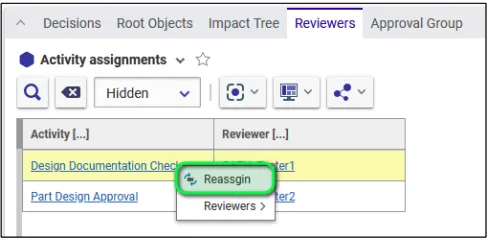
How to reassign the Design Verification Workflow activities?
How to reassign the Design Verification Workflow activities? Once the workflow is launched, the creator of the workflow can, in case of need, reassign the workflow activities (that are not yet completed) to another user. This one must have the role required by the activity (Design Reviewer or Equipment Owner) on all the Design Codes
-
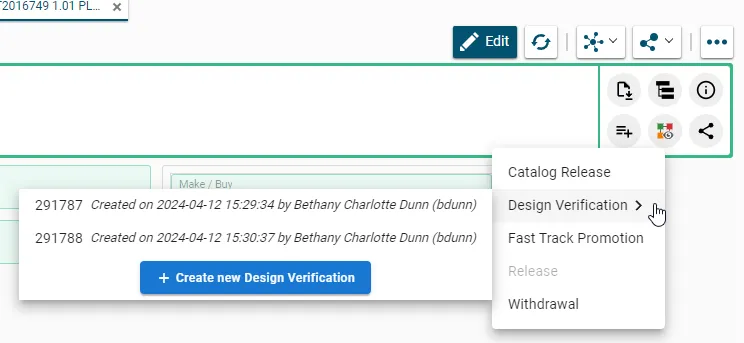
How to create and launch the Design Verification Workflow?
How to create and launch the Design Verification Workflow? You can create the Design Verification Workflow from the Part by clicking on the icon of the Workflow and then select Design Verification in the drop-down menu. Any already existing Design Verification workflows of the Part that are "In Preparation" will be proposed. Alternatively a new
-
What is the concept of the Design Verification Workflow?
What is the concept of the Design Verification Workflow? The Design Verification workflow is used to approve the Design data. Since we are working in Part Centric mode, this workflow allows to approve the Part and all its content. In other words, it will not be possible to approve a single Drawing by using this
-

What is the baseline’s behaviour?
What is the baseline’s behaviour? The baseline’s behaviour is determined by the expansion strategy and the filter it uses. The filter corresponds to the type of documents that are assigned (or not) to the baseline. The only expansion strategy used is the top-down strategy. You can use the filter to assign a baseline to a
-
What are the consequences of generating a baseline?
What are the consequences of generating a baseline? After a baseline has been created, the document(s) assigned to it cannot be edited or deleted (lifecycle status cannot be modified). The information about the baseline can be found in the document’s profile card. The structure covered by the baseline cannot be edited and is frozen. The
-
How to create the baseline?
How to create the baseline? You are able to create the baseline: Fill in all the necessary information and generate the baseline, click on the "Generate" button, which is enabled after the baseline has been saved. To more about baselines, follow the document below. Baseline
-
What is the purpose of creating a baseline?
What is the purpose of creating a baseline? The purpose of creating a baseline is to freeze any kind of structure (a part or a CAD document) along with all the documents belonging to that structure to which the baseline creator has access. By creating a baseline, you can: The FAQ document below will present
-
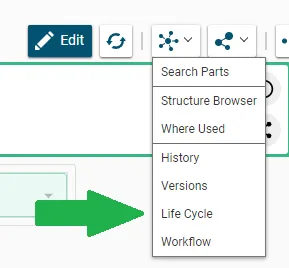
How to use the “Life Cycle” command to see the possible states and transitions?
How to use the “Life Cycle” command to see the possible states and transitions? The “Life Cycle” command displays a map of the life cycle of the object from which the command is launched. Documents, CAD documents and parts share the same life cycle. The same map is therefore displayed for all three types of
-
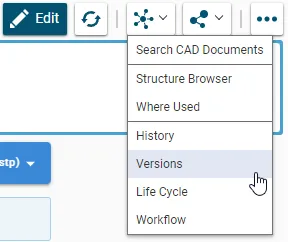
How to view other versions of an object?
How to view other versions of an object? The “Versions” command grants you access to view all of the versions of a given object. From the pop up window you can open an old version of the object in a new PLM window. It is also possible to compare two versions using the split screen