
Tag: PLM – Part & BOM
-
How to get the access rights in the Design Code?
How to get the access rights in the Design Code? PLM users can directly request Design Code access from the PLM platform through a dedicated access request interface. The administrators of the group will be responsible for handling your request and you'll get notified by email as soon as a decision is taken.
-
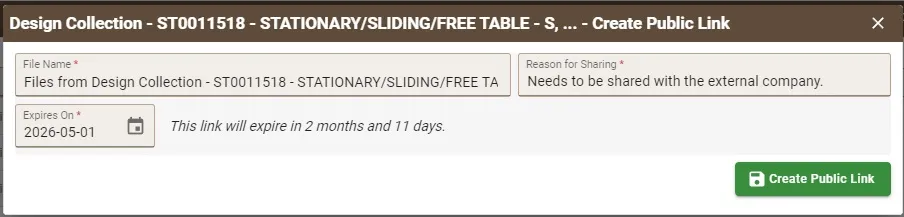
How to create the Public Link?
How to create the Public Link? Public Links must be created from an Approved Design Collection. In the creation window, users must: After completing the required fields: When the link is opened in any browser, the external user can directly download a ZIP file containing the documents related to the Part without authentication required.
-
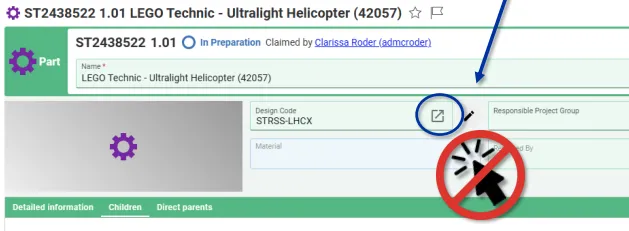
How to change a Design Code?
How to change a Design Code? To change the Design Code assigned to a Part follow the steps below: Note, in Edit mode, the icon next to the Design Code field opens the current Design Codes profile card. It cannot be used to search and select a new code. Note: If you would like to
-
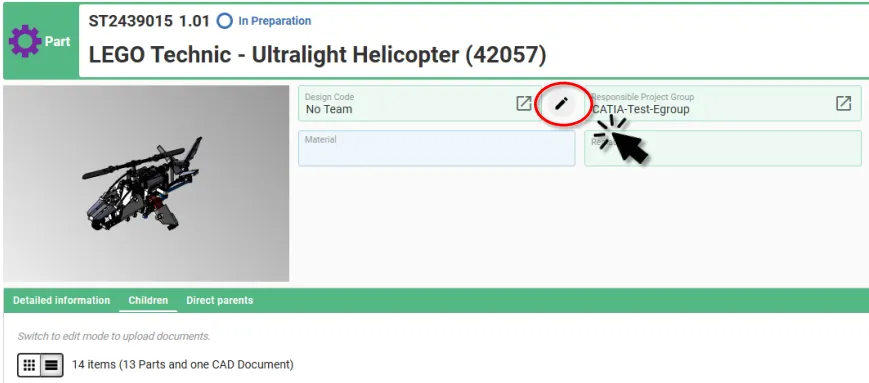
How to add and/or propagate a Design Code?
How to add and/or propagate a Design Code? In the PLM Platform there are two ways to add a Design Code to a Part, and one method to add and propagate it down to the child Parts: Adding and propagating Design Codes using the Pen Tool Selecting the small pen icon will display a new
-
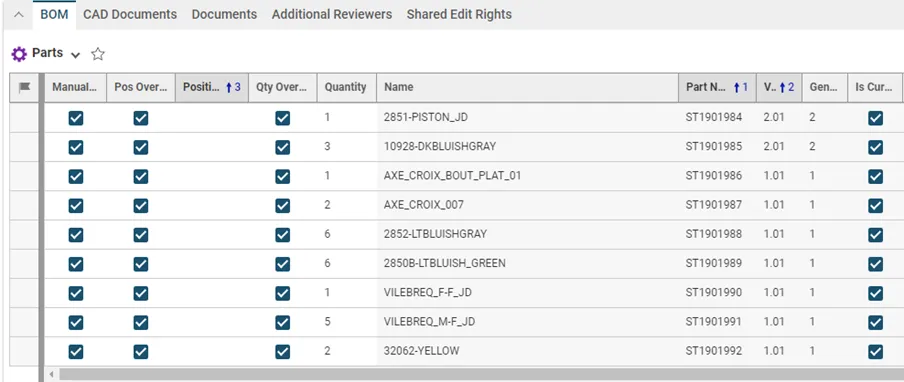
How to handle the BOM update of a SmarTeam to PLM migrated CAD structure?
How to handle the BOM update of a SmarTeam to PLM migrated CAD structure? Usually, when working with CATIA and the PLM, the Bill Of Materials is updated automatically after each CATIA save via the PWB connector (e-BOM sync). This is the case for all new CAD Documents created and modified in the PLM. However,
-
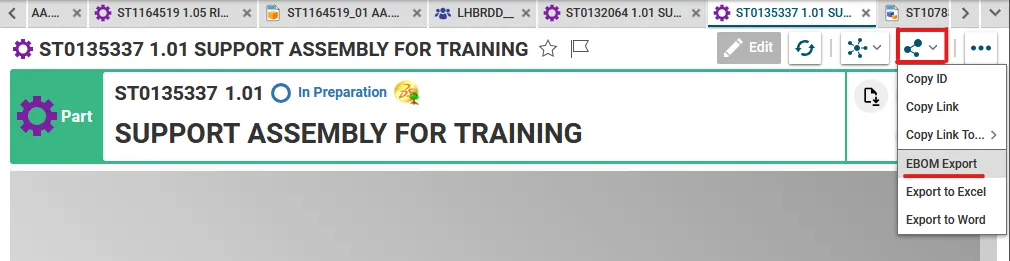
How to export a BOM in Excel from the PLM?
How to export a BOM in Excel from the PLM? There is 2 ways to get access to the Excel EBOM Export tool: 1. From a Part Profile Card, in the "Share" menu: 2. Or from the Part search grid. A. open the search grid: B. search for your Part. C.use the contextual menu
-
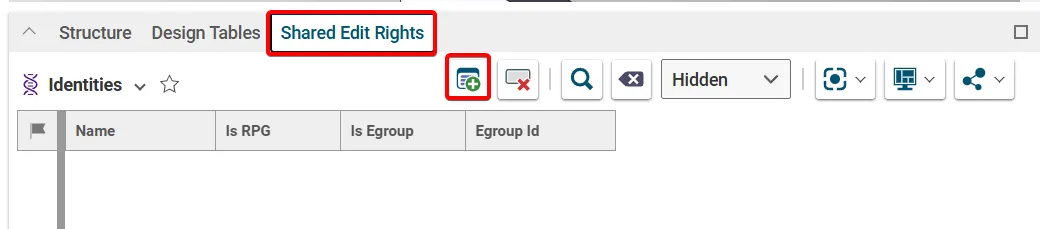
How to grant a user access to a specific document? (Shared edit rights)
How to grant a user access to a specific document? (Shared edit rights) Edit rights to a document is controlled via its Design Code and Responsible Project Group (RPG), which is set on its Parent Part. If a colleague requires edit rights to all the documents with one of these attributes, they should request access
-
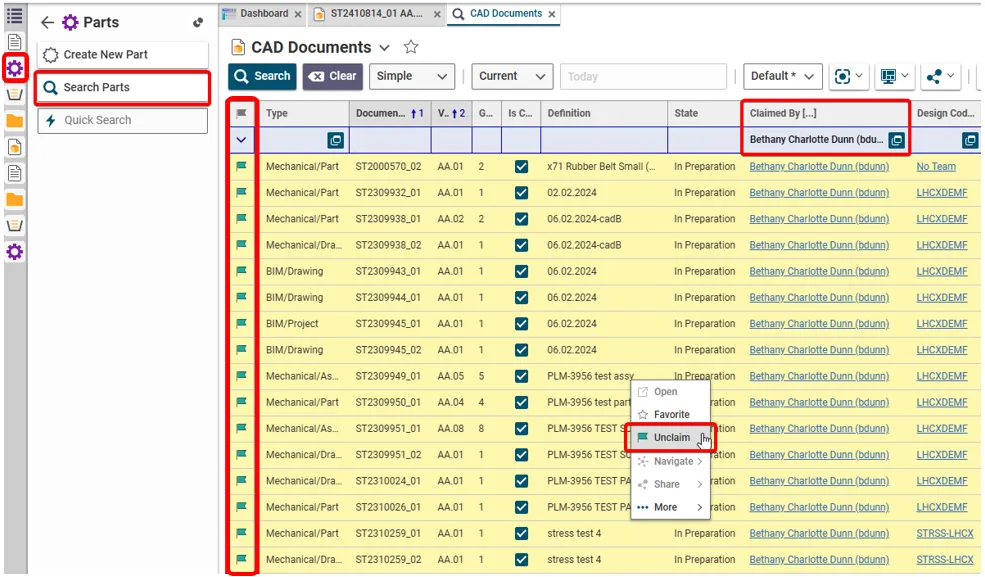
How to retrieve and unclaim all my Parts/Documents in one operation?
How to retrieve and unclaim all my Parts/Documents in one operation? There are two ways of retrieving all the objects that you have claimed. To unclaim all the objects in one go, use method 2 and highlight the results. (Press and hold the Ctrl key to select individual results. Alternatively, select a result then hold
-
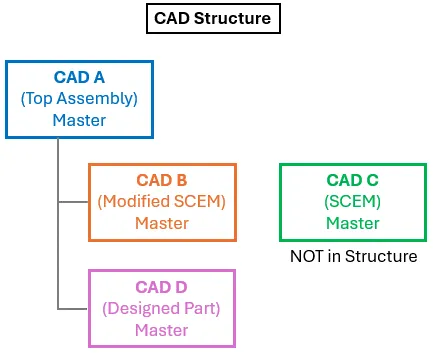
How to validate a CAD structure where a master document is not in BOM (PLM)?
How to validate a CAD structure where a master document is not in BOM (PLM)? In most situations all master CAD documents in a CAD structure are contained in the assembly’s BOM. However, there is a valid use case where this is not true. For example, a component in a structure will be manufactured from
-
Subgroup: Other
Subgroup: Other Below are the remaining How-to's that are not present in other subgroups in the PLM – Part & BOM subcategory. Click on their links to find more information on these topics.