
How to create the Public Link?
Public Links must be created from an Approved Design Collection.
- Open the approved Design Collection.
- In the top-left corner of the profile card, click “More actions” (three-line menu).
- Select “Public Links”.
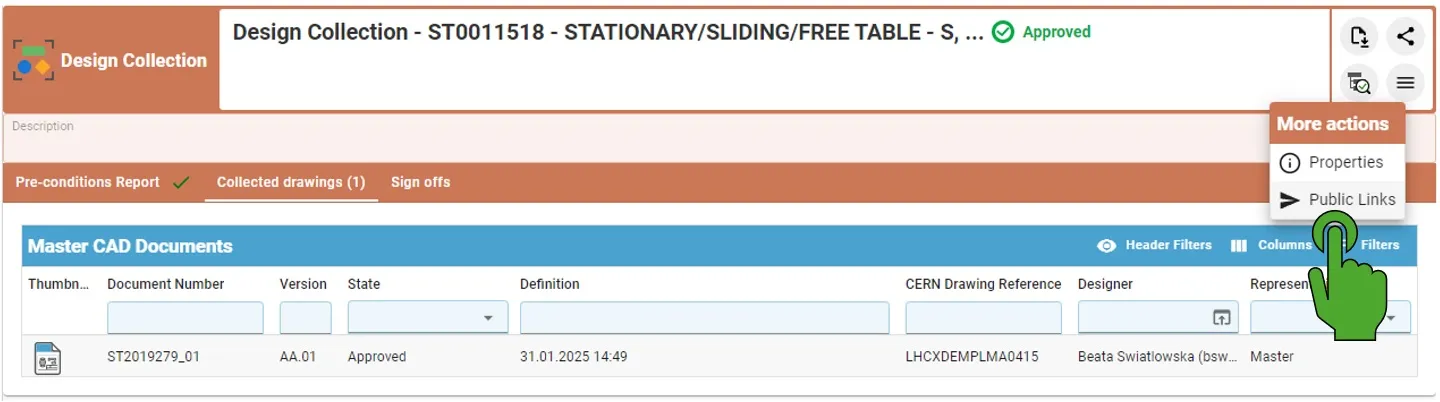
- A creation window opens with the related Design Collection automatically added.
In the creation window, users must:
- Modify the file name (optional).
- Provide a reason for sharing (minimum 10 characters and it is mandatory).
- Define the expiration date.
- Minimum: 1 day
- Maximum: 6 months
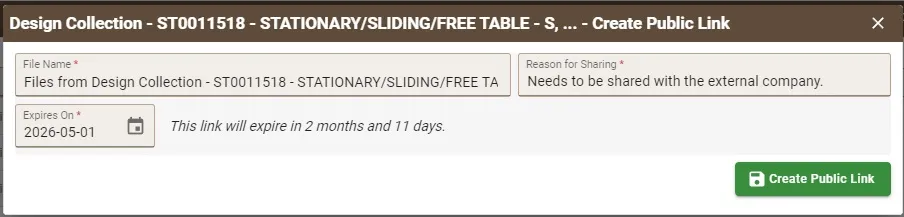
After completing the required fields:
- Click the “Create Public Link” button.
- The system generates the Public Link.
- Copy the link to the clipboard and share it with the external partner.
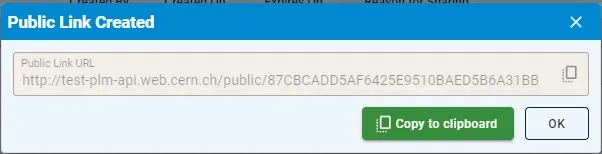
When the link is opened in any browser, the external user can directly download a ZIP file containing the documents related to the Part without authentication required.