
Tag: CDD to PLM transition
-
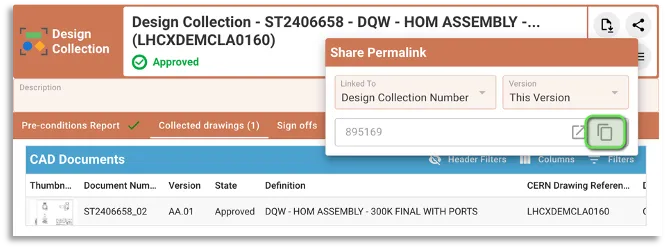
How to manage EDMS Drawing Folders with Design Collections ?
How to manage EDMS Drawing Folders with Design Collections ? The “Design Collection” functionality in PLM has been introduced to replace the EDMS Drawing Folders functionality. However it is still possible to use an EDMS Drawing Folder together with a PLM design collection as described hereafter. Detailed information about the PLM functionality can be found
-
How the Drawing ISO Lifecycle states match with old EDMS/CDD ones?
How the Drawing ISO Lifecycle states match with old EDMS/CDD ones? To comply with ISO Standards that has been implemented in the PLM platform, the Drawings Lifecycle States have been updated in EDMS after the data was synchronized with the PLM. ISO 11442:2006 specifies a limited set of Lifecycle States, each with a specific meaning:
-
How to access the PLM training?
How to access the PLM training? Before working in the PLM please follow the available training material depending on your usage and requirements. The trainings can be found here.
-
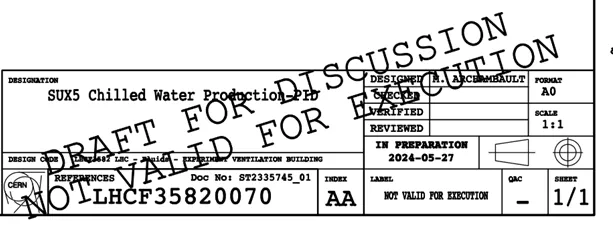
What is the difference between the regular Titleblock stamp and the Mini stamp?
What is the difference between the regular Titleblock stamp and the Mini stamp? Regular Titleblock stamp: Case 1: you are working at CERN with an official CAD tool and a PLM Connector (ex: BricsCAD, CATIA etc…). Thus, you must generate an official CERN Titleblock on your Drawing prior to validating it. Then when a Design
-
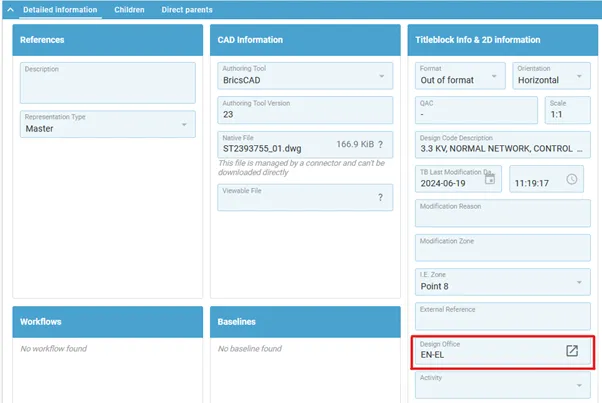
How is the position of the mini stamp defined?
How is the position of the mini stamp defined? The position of the mini stamp is defined via the “Design Office” property, that sets a specific position for the mini stamp for each drawing format (A0, A1…). As a result, this property becomes mandatory and must be filled for any Drawing that is not Connector
-
Subgroup: Other
Subgroup: Other Below are the remaining How-to's that are not present in other subgroups in the CDD to PLM transition category. Click on their links to find more information on these topics.
-
Subgroup: Terminology and Basics
Subgroup: Terminology and Basics Below is a group of How-to's that are related to the topic of 'Terminology and Basics' in the CDD to PLM transition category. Click on their links to find more information on these topics.
-
Subgroup: Reviewing Workflows
Subgroup: Reviewing Workflows Below is a group of How-to's that are related to the topic of 'Reviewing Workflows' in the CDD to PLM transition category. Click on their links to find more information on these topics.
-
How to validate a Drawing in the PLM Platform ?
How to validate a Drawing in the PLM Platform ? It is not possible to validate a single CAD Document in the PLM platform. The Design Verification Workflow acts on the Part and collects all the CAD Documents and Documents attached to the Part, plus its BOM. Complete documentation: Design Verification Workflow FAQ
-

How to replace an Object (CAD Document/Document/Part) with another one ?
How to replace an Object (CAD Document/Document/Part) with another one ? The "Replace By" command can be accessed directly from the profile cards of the following object types: The command is accessible from the "More" menu . Please note that the name of this command adapts according to the object from which this command is