
Tag: CATIA – Drafting
-
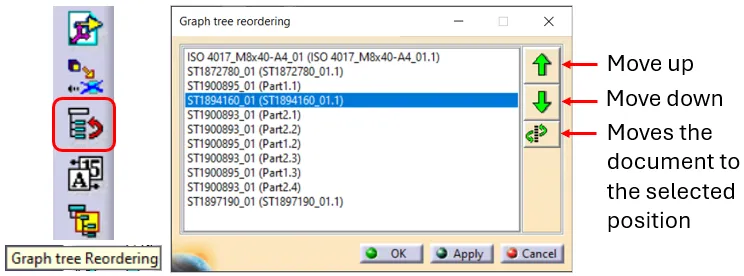
How to reorder a BOM?
How to reorder a BOM? The order of the BOM is determined by the CATIA tree. The BOM is built based on the positions and quantities in the CATIA tree, using a top-down approach. Please note: There are manual ways to override the CATIA positions & quantities, for further information on this see the FAQ
-

How to project a BOM on a drawing?
How to project a BOM on a drawing? A BOM can be projected onto a drawing using the Title Block Editor (TBE). When you click on the Title Block Editor icon in CATIA V5, it will open in a new window. The BOM can be found in the second tab, called “Bill of Materials”. Check
-

How to update a BOM in the PLM?
How to update a BOM in the PLM? The PLM uses an automatic engineering BOM (EBOM). This means every time you save an assembly the BOM will be created/updated on each ‘claimed’ or ‘new’ assembly node. The BOM uses the positions and quantities of the instances in the CATIA tree, using a top-down approach. Please
-
Subgroup: Other
Subgroup: Other Below are the remaining How-to's that are not present in other subgroups in the CATIA – Drafting subcategory. Click on their links to find more information on these topics. General:
-
Subgroup: Open
Subgroup: Open Below is a group of How-to's that are related to the topic of 'Open' in the CATIA – Drafting subcategory. Click on their links to find more information on these topics. General: How to open a 3D from the corresponding 2D in CATIA? PLM Related:
-
Subgroup: BOM & Tables
Subgroup: BOM & Tables Below is a group of How-to's that are related to the topic of 'BOM & Tables' in the CATIA – Drafting subcategory. Click on their links to find more information on these topics. General: PLM Related:
-
Subgroup: Sheet & View Generation Settings
Subgroup: Sheet & View Generation Settings Below is a group of How-to's that are related to the topic of 'Sheet & View Generation Settings' in the CATIA – Drafting subcategory. Click on their links to find more information on these topics. General:
-
Subgroup: Scenes & Views
Subgroup: Scenes & Views Below is a group of How-to's that are related to the topic of 'Scenes & Views' in the CATIA – Drafting subcategory. Click on their links to find more information on these topics. General:
-
Subgroup: Dimensions & Symbols
Subgroup: Dimensions & Symbols Below is a group of How-to's that are related to the topic of 'Dimensions & symbols' in the CATIA – Drafting subcategory. Click on their links to find more information on these topics. General:
-

How to change the settings in Drawing to CGR or Approximate?
How to change the settings in Drawing to CGR or Approximate? The CGR and Approximate format contains only the graphical representation of the geometry. These options allows you to choose different appearances of the linework of your Drawing. The CGR files are facetted models for visualisation that can't be edited but they can be used