
Tag: CATIA – Assembly
-
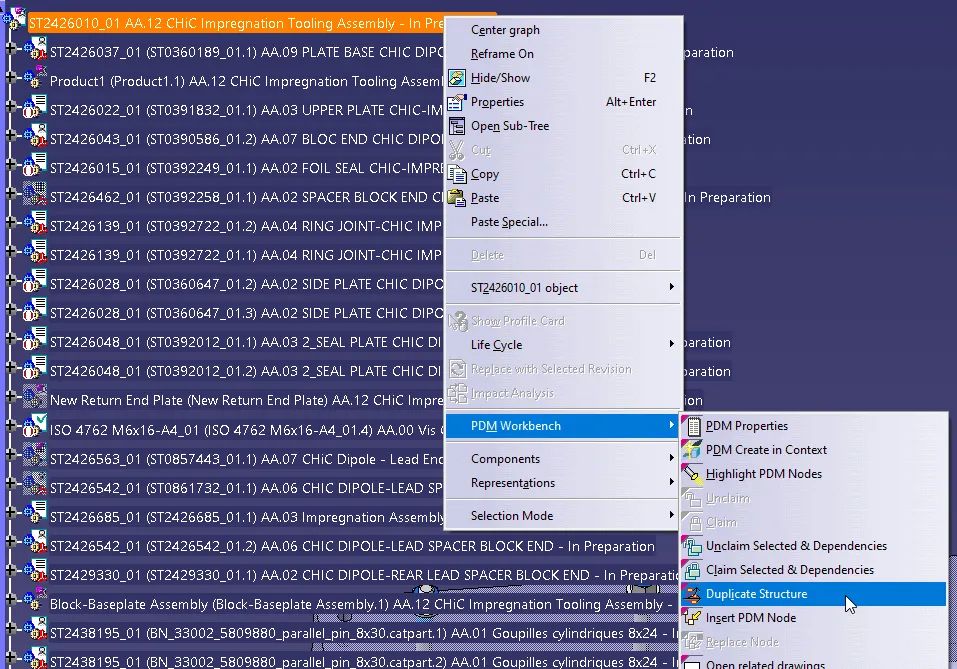
How to duplicate a structure?
How to duplicate a structure? You can duplicate an entire structure using the following tool from the PDM workbench contextual menu. It will duplicate the entire structure, top down from the selected node. Once clicked, a list of the selected structure will open in the duplicate window, see the image below. As standard the whole
-
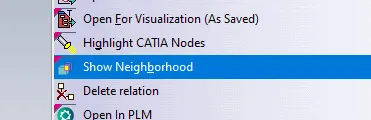
How to open via neighbourhood search (Spatial search and opening)
How to open via neighbourhood search (Spatial search and opening) In the PWB it is possible to open a specific document in context, along with any documents that touch its bounding box in the specified context. For example, if you have an engine and want to visualise only the parts that surround the crankshaft, this
-
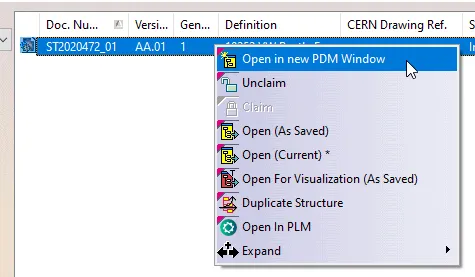
How to Open a structure in context (partial loading)?
How to Open a structure in context (partial loading)? In the PWB it is possible to open on demand only certain selected nodes of the PDM structure in CATIA. This may be useful when you only need to load a specific set of nodes from a heavy model, but would like to save it in
-
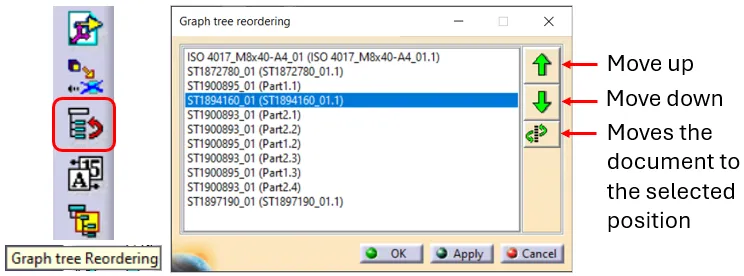
How to reorder a BOM?
How to reorder a BOM? The order of the BOM is determined by the CATIA tree. The BOM is built based on the positions and quantities in the CATIA tree, using a top-down approach. Please note: There are manual ways to override the CATIA positions & quantities, for further information on this see the FAQ
-

How to project a BOM on a drawing?
How to project a BOM on a drawing? A BOM can be projected onto a drawing using the Title Block Editor (TBE). When you click on the Title Block Editor icon in CATIA V5, it will open in a new window. The BOM can be found in the second tab, called “Bill of Materials”. Check
-

How to update a BOM in the PLM?
How to update a BOM in the PLM? The PLM uses an automatic engineering BOM (EBOM). This means every time you save an assembly the BOM will be created/updated on each ‘claimed’ or ‘new’ assembly node. The BOM uses the positions and quantities of the instances in the CATIA tree, using a top-down approach. Please
-
Subgroup: Other
Subgroup: Other Below are the remaining How-to's that are not present in other subgroups in the CATIA – Assembly subcategory. Click on their links to find more information on these topics. General: PLM Related:
-
Subgroup: Tools
Subgroup: Tools Below is a group of How-to's that are related to the topic of 'Tools' in the CATIA – Assembly subcategory. Click on their links to find more information on these topics. General:
-
Subgroup: Scenes & Views
Subgroup: Scenes & Views Below is a group of How-to's that are related to the topic of 'Scenes & Views' in the CATIA – Assembly subcategory. Click on their links to find more information on these topics. General:
-
Subgroup: Constraints & Positioning
Subgroup: Constraints & Positioning Below is a group of How-to's that are related to the topic of 'Constraints & Positioning' in the CATIA – Assembly subcategory. Click on their links to find more information on these topics. General: