
Tag: CATIA – Getting Started
-
What tools are available in the PDM Workbenches (PWB)
What tools are available in the PDM Workbenches (PWB) The PLM and CATIA are connected through the connector, PDM Workbench (PWB). There is a toolbar and different workbenches for the various CATIA workbenches (Part Design, Assembly design, drafting). The PDM workbenches do not contain any modelling tools, but have tools to manage the documents such
-
What’s the difference between the different CATIA configurations?
What’s the difference between the different CATIA configurations? There are three main different CATIA configurations that can be selected from the drop down in the CATIA launcher menu, small, large and equipment systems. Below details the main differences in their set up: More: Getting started with CATIA / PLM at CERN FAQ
-
What are the meanings of the CATIA & PLM Icons?
What are the meanings of the CATIA & PLM Icons? Icons are used throughout the PLM and in the CATIA specification tree to quickly convey information. See the documentation below to find the explanation of each icon. More: FAQ
-
What are the CATIA Acronyms?
What are the CATIA Acronyms? Below is a list of acronyms that are used in relation to CATIA. See the list of PLM Acronyms here. See the list of SmarTeam Acronyms here.
-
How to save a new CAD document in the PLM from CATIA?
How to save a new CAD document in the PLM from CATIA? The first part of the FAQ linked below will show you a quick method of saving a CAD document without dependencies, like a CATPart. The second, more detailed section will describe how to save a structure where the files are linked to each
-
Subgroup: Other
Subgroup: Other Below are the remaining How-to's that are not present in other subgroups in the CATIA – Getting Started subcategory. Click on their links to find more information on these topics. General:
-
Subgroup: The Basics
Subgroup: The Basics Below is a group of How-to's that are related to the topic of 'The Basics' in the CATIA – Getting Started subcategory. Click on their links to find more information on these topics. General: SmarTeam Related: PLM:
-
Subgroup: Installation & Access
Subgroup: Installation & Access Below is a group of How-to's that are related to the topic of 'Installation & Access' in the CATIA – Getting Started subcategory. Click on their links to find more information on these topics. PLM Related:
-
How to get started with CATIA / PLM at CERN
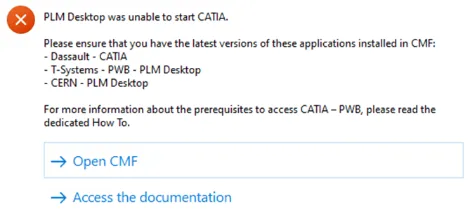
How to get started with CATIA / PLM at CERN Please follow the necessary training before using the PLM. You can access the training and learning path here, this will help you identify what training is necessary for you depending on your previous experience and knowledge. Training on the CATIA-PLM connector (PWB) is a prerequisite
-
Who to contact for support?
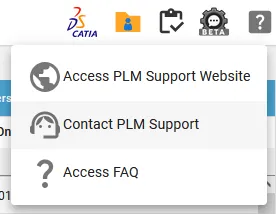
Who to contact for support? For support, please send an email to plm-support@cern.ch. A request will be automatically created in the Service-Now Platform. For urgent/blocking issues, please call the hotline: 160660 For CAD designers, it is also possible to report an issue from the PLM desktop application. This way, the request created in Service Now